




This page provides comprehensive hardware guidance for GFI KerioControl deployments:
- 📦 Custom Hardware Appliances – Complete tested systems for KerioControl deployment
- 🔌 V10 Supported Components – SFP modules, USB adapters, WiFi dongles (v10+ only)
This guide helps you choose suitable hardware for your deployment needs and provides insights from field-tested configurations by GFI Software and global partners.
GFI-tested hardware appliances
Brand: Qotom
| Model | CPU | RAM | Storage | NICs |
| Q790G4 S04 | Intel Celeron Elkhart Lake J6412 Quad-core 2.0 GHz | (Up to 16G) | 1x mSATA 1x SATA 3.0 | 4 x Realtek Gigabit LAN |
Performance tests
Hardware specifications: Q790G4 with 8GB RAM, 32GB SSD with GFI KerioControl v9.4.3p1.
ISP Link:700 Mbps Download / 200 Mbps Upload
Test Environment: File downloads, YouTube videos, and web traffic were used to generate traffic.
The results of the performance tests are shared below:
Performance metrics | Low-Medium Traffic | Full Load |
Bandwidth | 600 to 650 Mbps Download | 350 to 400 Mbps Download 180 to 200 Mbps Upload |
Connections | 300 to 500 | 1000+ |
RAM Usage | ~ 1 to 1.5GB | ~ 2GB |
CPU Usage | ~ 30% | ~50% |
*These tests were performed on GFI KerioControl v9.4.3p1.
Qotom Mini PC
Component | Specification |
Brand | Qotom Mini PC |
CPU | Intel i7-13620H |
RAM | 32 GB DDR5 |
Storage | 1 TB NVMe SSD |
NICs | 4 × Intel i226 2.5 GbE LAN + 2 × 10 Gb SFP+ |
Performance Test Results (KerioControl v10 9139)
Metric | Result |
Software Version | KerioControl v10 9139 |
Network Link | 1 Gbps fiber connection |
Speed Test (fast.com) | Exceeding 1.1 Gbps |
CPU Utilization | Consistently below 15% |
Simultaneous Up/Download | No performance degradation |
Key Features:
- 2.5 GbE ports functioning correctly.
- 10 GbE SFP+ ports working (dedicated switch for video editing no degradation).
- Intrusion Prevention System (IPS) activated with no degradation).
- VLANs configured and operational.
- VPN connections.
Brand: ICOS
Model | CPU | RAM | Storage | NICs |
4-core Intel(R) Celeron(R) J4125 CPU @ 2.00GHz | 4 GB | 60 GB | 4 x I211 Gigabit LAN | |
Intel(R) Core(TM) i5-8250U CPU @ 1.60GHz | 8 GB | 240 GB | 6 x I211 Gigabit LAN | |
Intel(R) Core(TM) i7-9700 CPU @ 3.00GHz | 16 GB | 500 GB | 2 x 82599ES 10-Gigabit SFP 6 x I211 Gigabit LAN |
Brand: HUNSN
Note:All devices in the below table have a form factor of 1U rack. More details related to dimensions, weight, and variants with different system specifications can be found in the links to each model. GFI internally tested KerioControl deployment on the appliances with the below specifications.
Model | CPU | RAM | Storage | NICs |
4-core Intel(R) Celeron(R) J4125 CPU @ 2.00GHz | 8 GB | 60 GB | 6 x Intel I210 Gigabit LAN | |
4-core Intel(R) Core(TM) i5-2520M CPU @ 2.50GHz | 8 GB | 60 GB | 8 x Intel I211 Gigabit LAN | |
4-core Intel(R) Core(TM) i3-4160 CPU @ 3.60GHz | 16 GB | 120 GB | 2 x 82599ES 10-Gigabit SFP |
*GFI Software has not conducted performance tests on the appliance yet.
Appliances used by partners
Brand:Custom Mini PC (Generic)
Model:Intel N100-based Mini PC
Model | CPU | RAM | Storage | NICs |
Intel N100 Mini PC | Intel Processor N100 (4-core) | 8GB | 32GB | Copper 4×2.5 Gbps |
Performance Tests
Hardware specifications: Intel N100 Mini PC running GFI KerioControl v10 Build 9163.
ISP Link: 350 Mbps / 50 Mbps testing performed
Performance Metrics | Test Results |
System Stability | Stable across multiple deployments |
ISP Speed Handling | Successful at 350/50 Mbps |
Network Connectivity | No gigabit required at this performance level |
Deployment Status | Production |
NOTE:Turbo Boost MUST be enabled. Without it, 800 MHz or 1 GHz performance will NOT meet requirements.
Brand: Generic Mini PC (Amazon)
Model | CPU | RAM | Storage | NICs |
Intel N150 Mini PC | Intel Processor N150 (4-core) | (Configurable) | NVMe SSD | 4 x Intel 2.5GbE LAN, 2 x 10GbE SFP+ |
Performance Tests
Hardware specifications:Intel N150 Mini PC with GFI KerioControl v10 Beta (build 9057).
ISP Link:1 Gbps / 2.5 Gbps testing performed
Test Environment:Network connectivity tests, SFP+ port recognition with Mikrotik SFP to 10GbE adapters.
NOTE:For 2.5Gbps GFI KerioControl v10 is mandatory
Performance Metrics | Test Results |
Port Recognition | All ports correctly recognized including SFP+ |
1 GbE Testing | Successful |
2.5 GbE Testing | Successful |
SFP+ Adapters | Mikrotik SFP to 10GbE adapters working |
10 GbE (Expected) | Expected to work (not yet tested) |
These tests were performed on GFI KerioControl v10 Beta (build 9057) in October 2025.
Brand: Yanling
Model | CPU | RAM | Storage | NICs |
Intel Kaby Lake Core i3-8130u AES-NI | 8GB DDR4 | 64 GB SSD | 6 x Intel Gigabit LAN |
*GFI Software has not conducted performance tests on the appliance yet.
Below are some of the environments that partner has used this appliance for:
- Home office with 15 to 40 devices, but only 5 to 6 users with c.a. 900Mbps throughput.
- Small satellite locations on LTE with c.a. ~60/20Mbps throughput, 4-15 devices, and up to 6 staff members.
- Larger offices with 80 to 100 devices c.a 50 users and 900Mbps bandwidth.
Brand: Kettop
Model | CPU | RAM | Storage | NICs |
Intel Celeron 2955U processor, dual-core 1.40 GHz | Up to 8GB | Up to 256 GB | 2 x Realtek RTL8111E Gigabit LAN | |
Intel Celeron Processor J1900 Quad-Core 2 GHz | Up to 8GB | Up to 256 GB | 4* Intel I211AT – 10/100/1000 Controller |
*GFI Software has not conducted performance tests on the appliance yet.
Installing GFI KerioControl Operating System on a custom appliance
GFI KerioControl in the Software Appliance edition is distributed as an ISO installation image. To generate a bootable USB flash drive from this ISO installation image:
- Navigate to the GFI KerioControl download page.
- Under Product, select “KerioControl”.
- Under Version, select “9.4.3 Patch 1”.
- Download the file named: “Kerio Control Software Appliance Installer (ISO)”.
- Finally, refer to the Generating a Bootable USB Flash Drive guide to create a bootable USB installer.
Important Note: For generating a bootable installer USB, you can use a tool like Rufus. Please ensure that you use the GPT partition scheme and UEFI as the Target system, as shown in the below image:
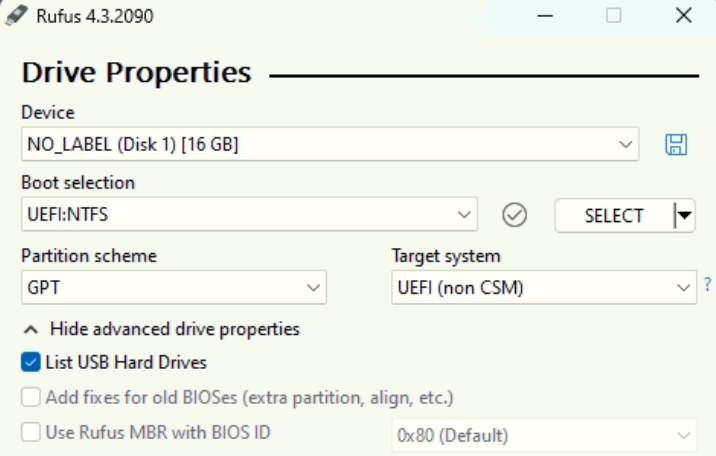
Once the USB has been generated, connect it to the appliance and turn it on (and enable UEFI boot – see the next section) – the installation runs automatically. For more information, please refer to Installing Software Appliance on bare-metal server.
Custom hardware appliances with KerioControl v10: UEFI Boot Fix
When installing KerioControl v10 on modern custom hardware (especially mini-PCs with NVMe storage) that use UEFI firmware, you may experience boot failures if the system is installed in Legacy BIOS mode. This is because the bootloader cannot find the installed system on a UEFI-only setup.
The solution:
During the KerioControl v10 installation process, you must explicitly select the UEFI option when prompted for boot mode/firmware. This ensures the system is correctly configured and will boot successfully after installation.
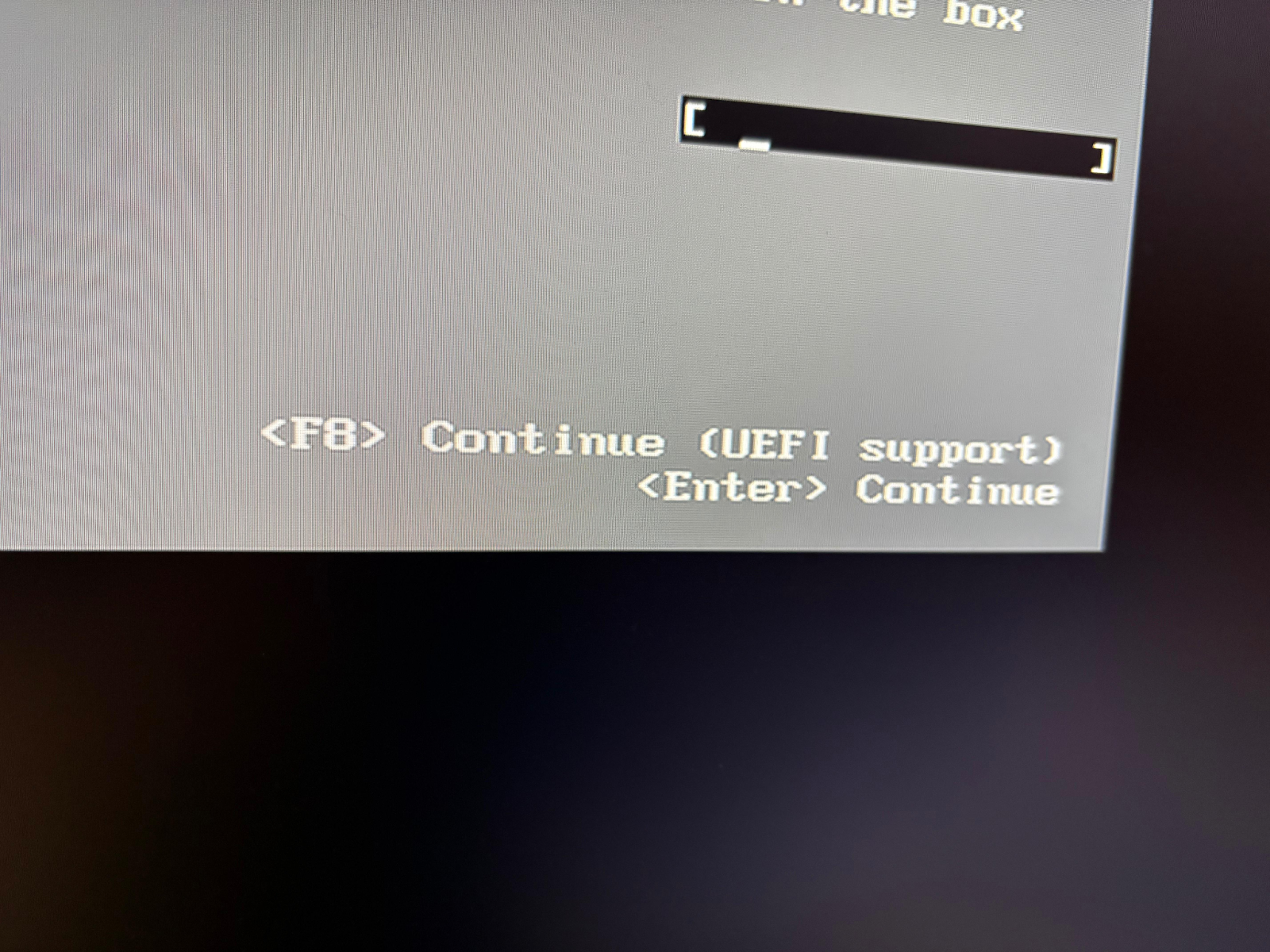
During the KerioControl v10 installation process, you must explicitly select the UEFI option when prompted for boot mode/firmware. This ensures the system is correctly configured and will boot successfully after installation.
BIOS settings
To enable UEFI boot, you would need to change one setting in the BIOS for your custom appliance. Below is an example for your reference:
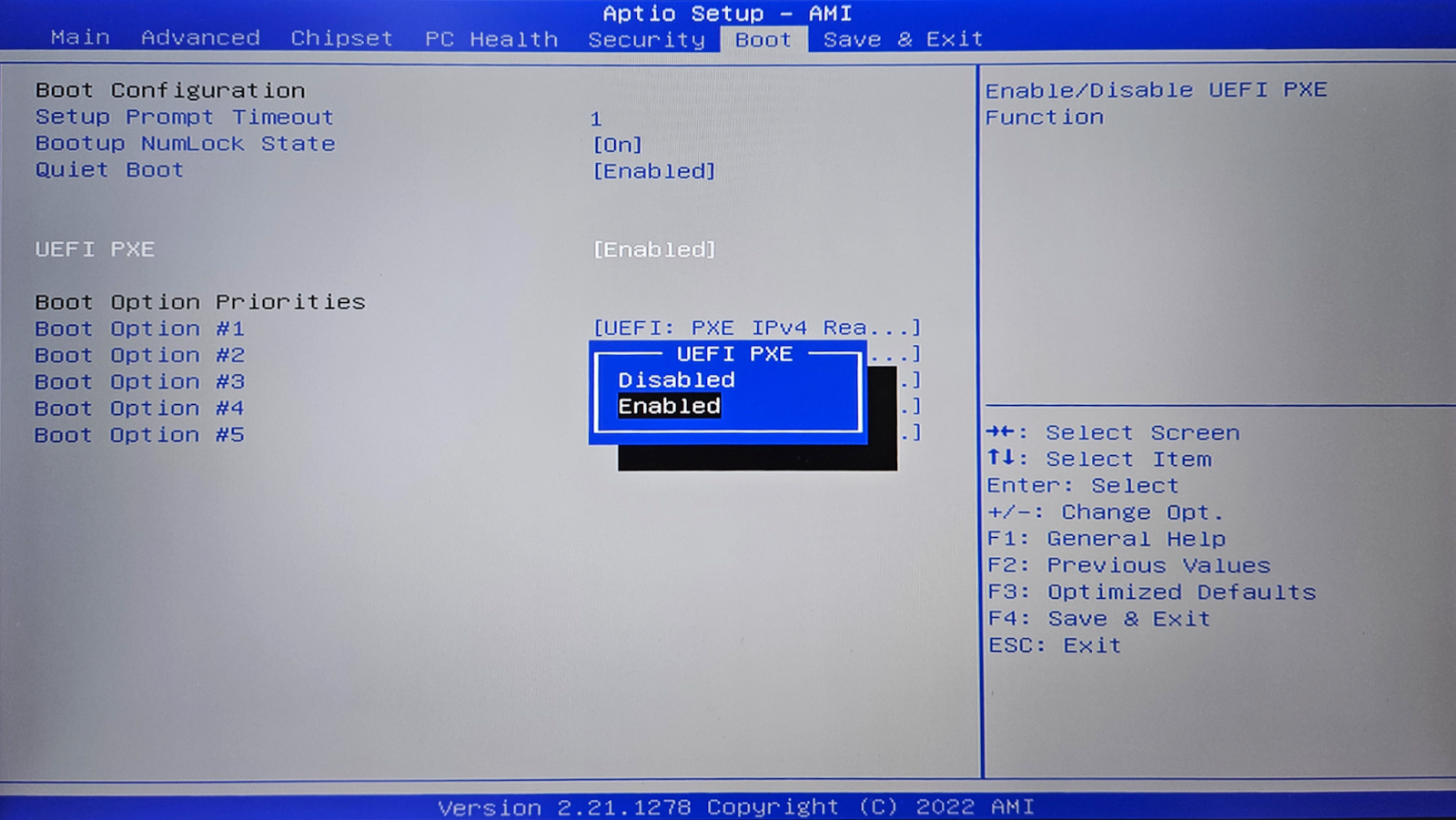
Limitation
Currently, there is one limitation in using a custom hardware appliance, compared to the GFI KerioControl NG Series. While the NG-appliance can group all LAN interfaces into a LAN switch, the capability is not supported with custom hardware appliances yet. That said, adding this enhancement is in our scope and is part of our immediate roadmap.
License
When requesting a license for a custom hardware appliance, please indicate to your distributor or GFI that an “OS – Linux” or “software appliance” license is required. Alternatively, if you are a Managed Service Provider and would be requiring the monthly billing option, please request a “KerioControl” MSP license.
Other considerations
- In case the appliance has no video output and has only RS 232, you can use the USB to RS232 adapter.
- During the boot, serial access requires a 115200 baud rate; whereas, during normal operations, the baud rate is 9600.
- Check the hardware appliance specifications for serial settings if you would need to use that for serial access.
Disclaimer
GFI Software provides this document for informational purposes only. It is intended to offer guidance on compatible third-party hardware appliances for use with GFI KerioControl. GFI Software does not endorse, certify, or assume responsibility for the performance, reliability, or any aspect of these third-party hardware appliances. Users are advised to independently verify the compatibility and functionality of such hardware with GFI KerioControl. GFI Software shall not be liable for any damages, losses, or liabilities arising from the use, performance, or reliance on these third-party products. This disclaimer does not affect any statutory rights of users that cannot be waived or limited by contract.
🔌 Supported Components for KerioControl v10 Kernel
⚠️ IMPORTANT: The devices listed below are ONLY compatible with KerioControl v10.
Device Categories:
- SFP Modules (15 devices) – Fiber and copper transceivers for 1G/10G/25G connectivity
- USB-to-Ethernet Adapters (18 devices) – Including 1GbE and 2.5GbE options
- WiFi Dongles (2 devices) – USB wireless adapters
These components enable flexible deployment options for KerioControl v10 on custom hardware platforms.
The Content of the table is then displayed on the page in a table
List of the Table for the Device components can be found in this sheet.
See Similar Display on this page.